---
tags:
  - document-parsing
  - ocr
---

<div align="center">

<img src="https://raw.githubusercontent.com/SoMarkAI/image_bed/main/OXR_README/assets/header.png" alt="" />

<h1>SoMark｜O<span style="color: #DE7802;">X</span>R</h1>

An open-source document parsing model with SOTA accuracy and speed, using an RSI loop during post-training.

---

**Turn documents into Agent-Friendly data.**

[🌐 Online Demo](https://free-oxr.somark.ai) ｜ [🔥 🆓 Free API](#free-api)

[![Hugging Face | OXR-1.0](https://img.shields.io/badge/Hugging%20Face-OXR--1.0-F59E0B?style=flat-square)](https://huggingface.co/SoMarkAI/OXR-1.0)   [![ModelScope | OXR-1.0](https://img.shields.io/badge/ModelScope-OXR--1.0-624AFF?style=flat-square)](https://modelscope.cn/models/SoMark/OXR-1.0)


![arXiv | Coming Soon](https://img.shields.io/badge/arXiv-Coming%20Soon-B31B1B?style=flat-square)

**English** · [简体中文](https://github.com/SoMarkAI/OXR/blob/main/README_CN.md)

</div>

OXR (Optical Everything Recognition) is an open-source model from the SoMark team. It turns PDFs and document images into Agent-Friendly data in Markdown or JSON, with layout coordinates included.

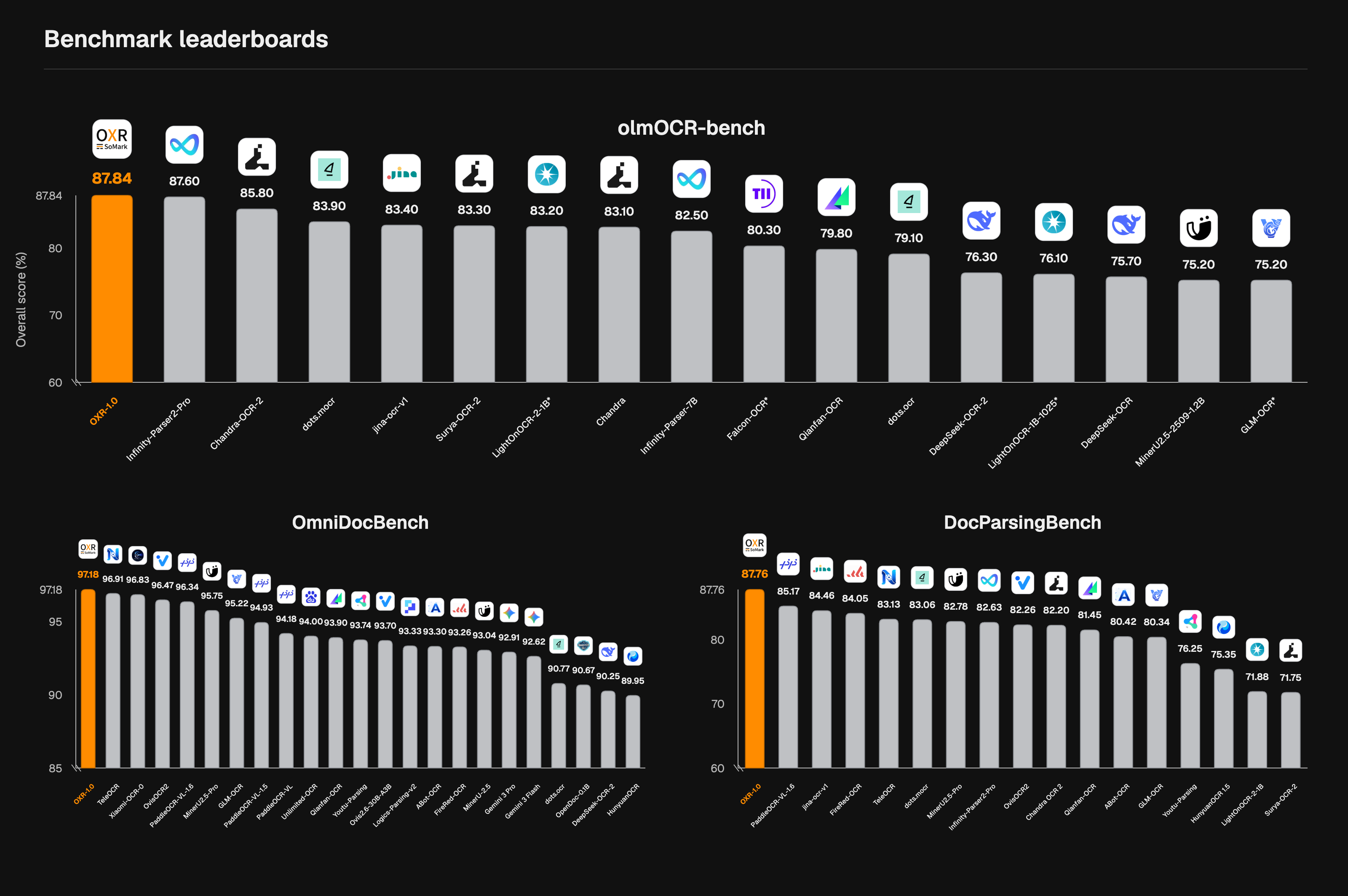
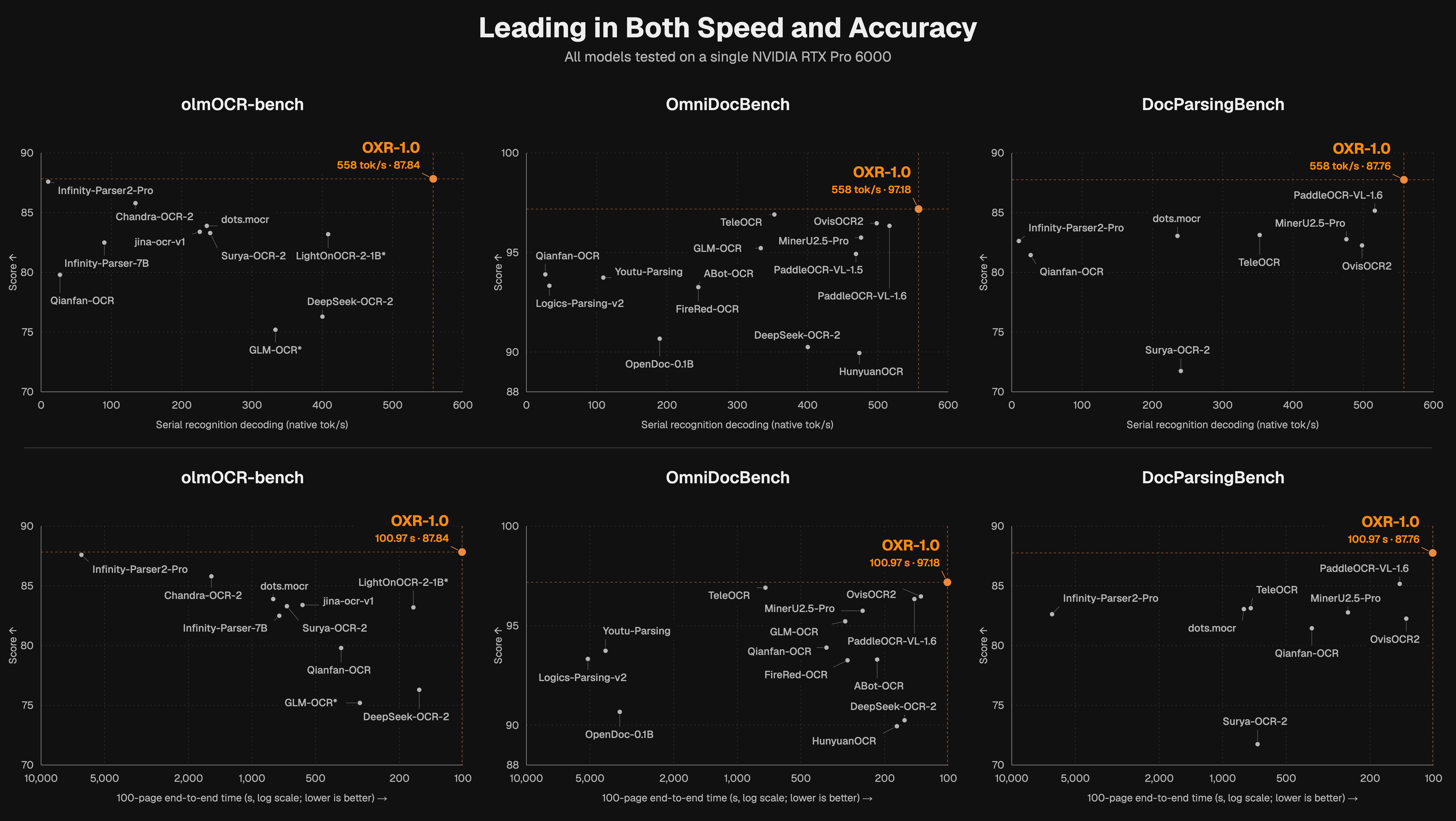
Pretrained from scratch, OXR uses a recursive self-improvement (RSI) loop during post-training—a first in document parsing. With just 1.3B parameters, OXR ranks #1 on olmOCR-Bench, OmniDocBench, and DocParsingBench while delivering industry-leading parsing speed.

OXR is the first to make its layout analysis module independent and pluggable. This design accelerates parsing and supports replacing the built-in layout model with a custom one. OXR continues to handle content recognition and reading order, enabling adaptation across diverse scenarios with minimal integration effort.
![](https://raw.githubusercontent.com/SoMarkAI/image_bed/main/OXR_README/assets/three-benchmark-leaderboards-olm-main.png)

![](https://raw.githubusercontent.com/SoMarkAI/image_bed/main/OXR_README/assets/speed-score-overview.png)

---

> If this project helps you, please click ⭐ Star in the top-right corner to support us. It's the best encouragement you can give the developers!


## Why OXR?

- 🎯 SOTA Accuracy. #1 Across Three Benchmarks.

  - OXR ranks 🏆#1 on olmOCR-Bench, OmniDocBench, and DocParsingBench, with a particularly wide lead in table parsing.
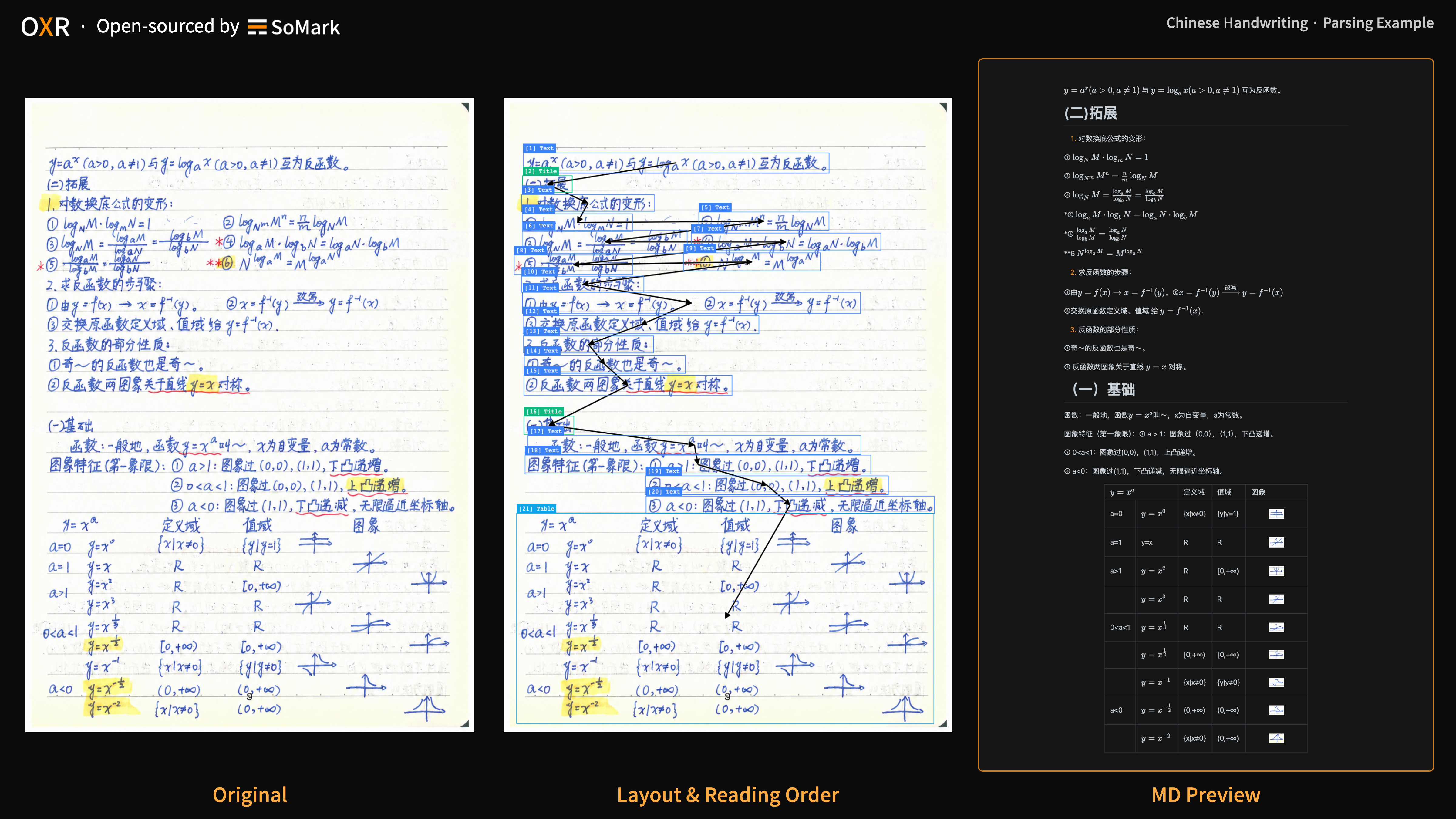
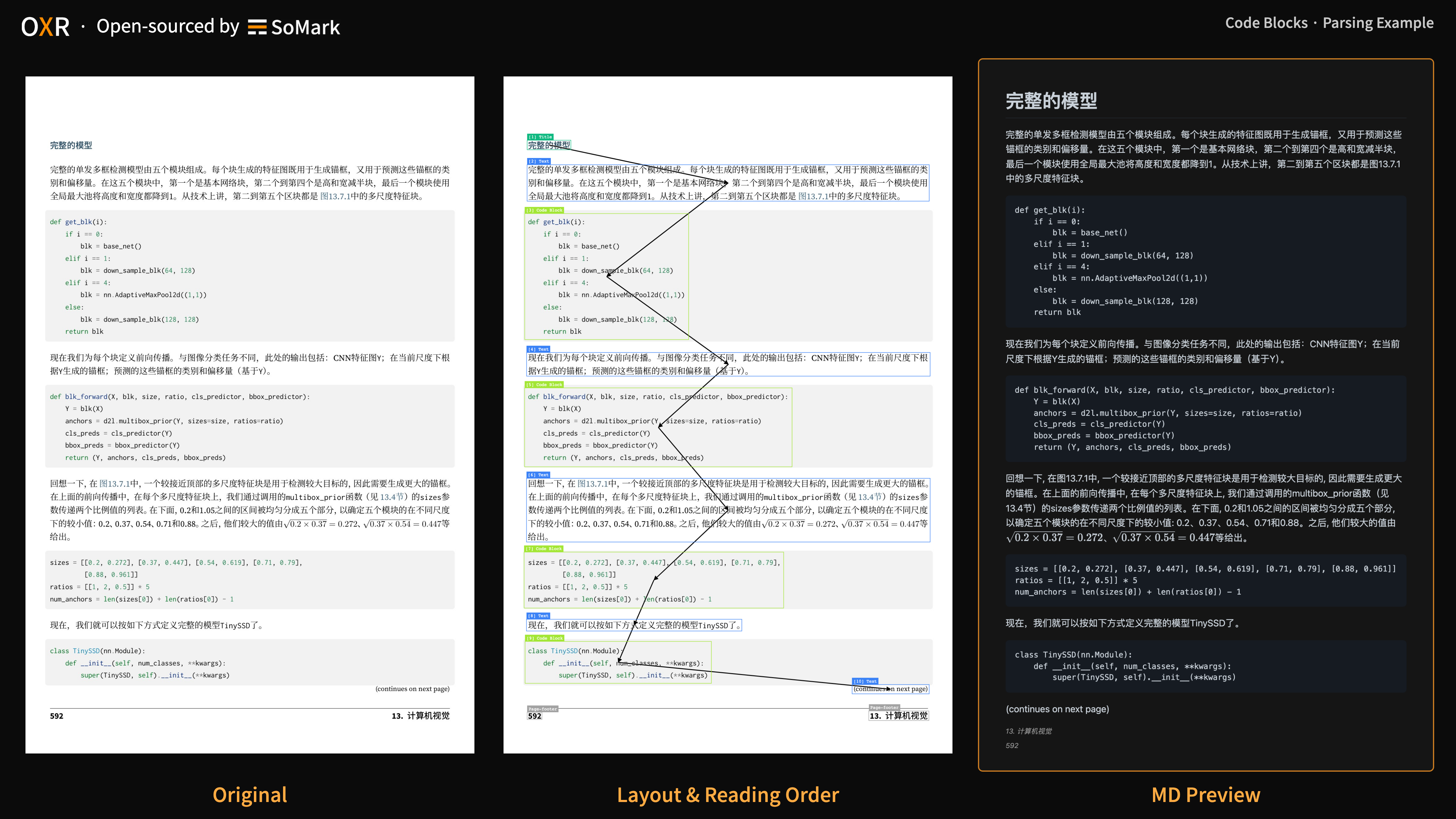
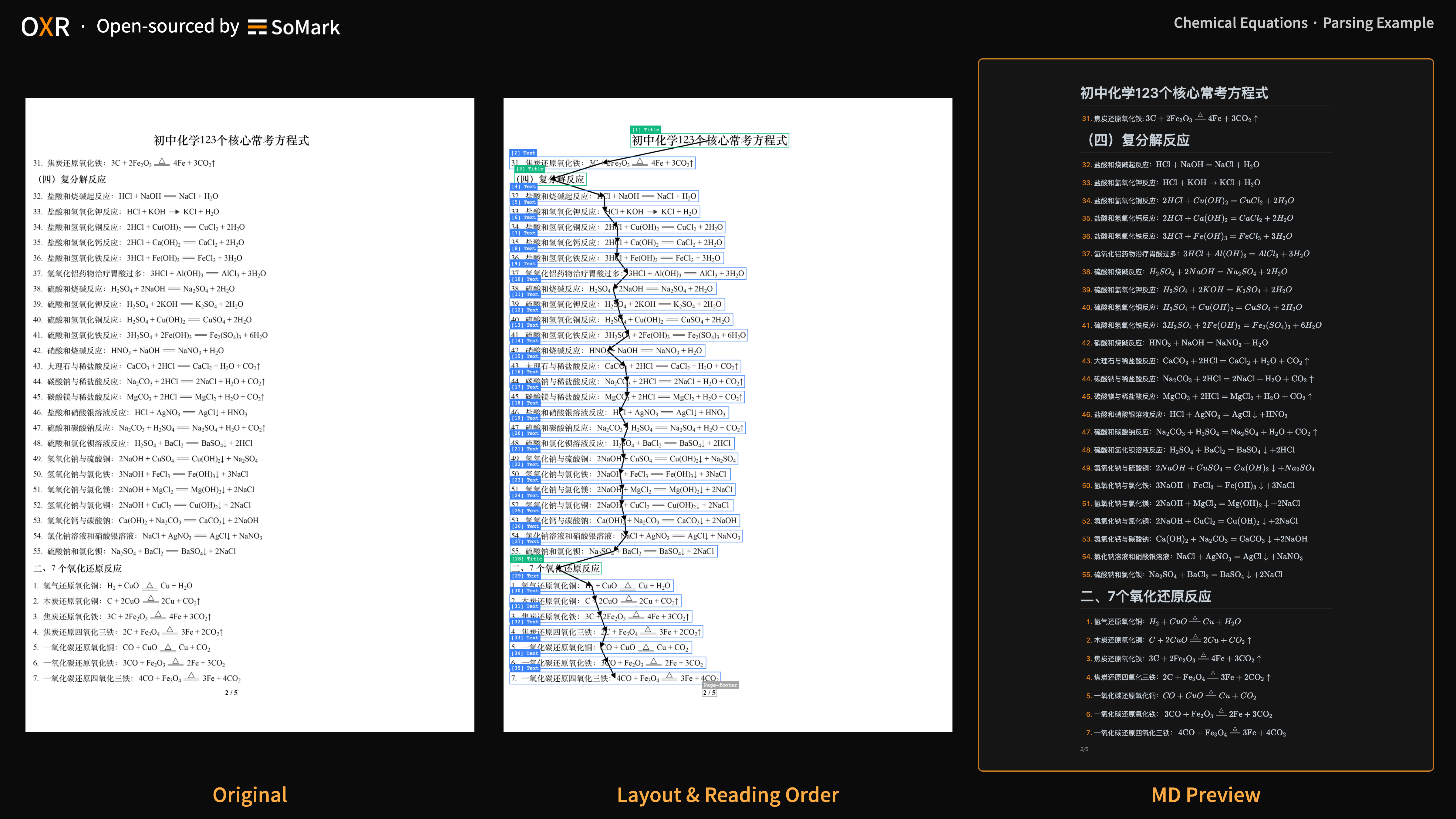
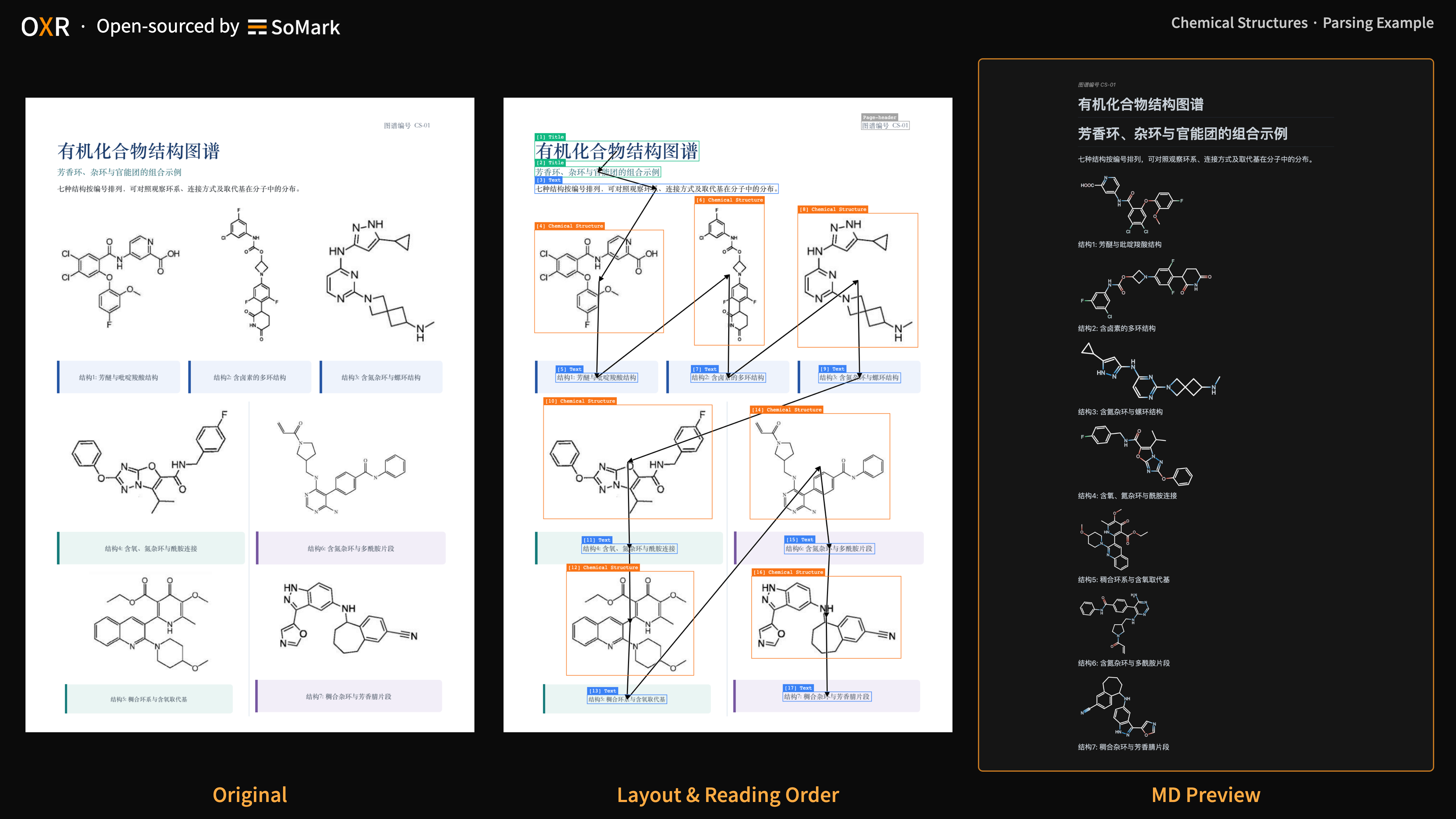
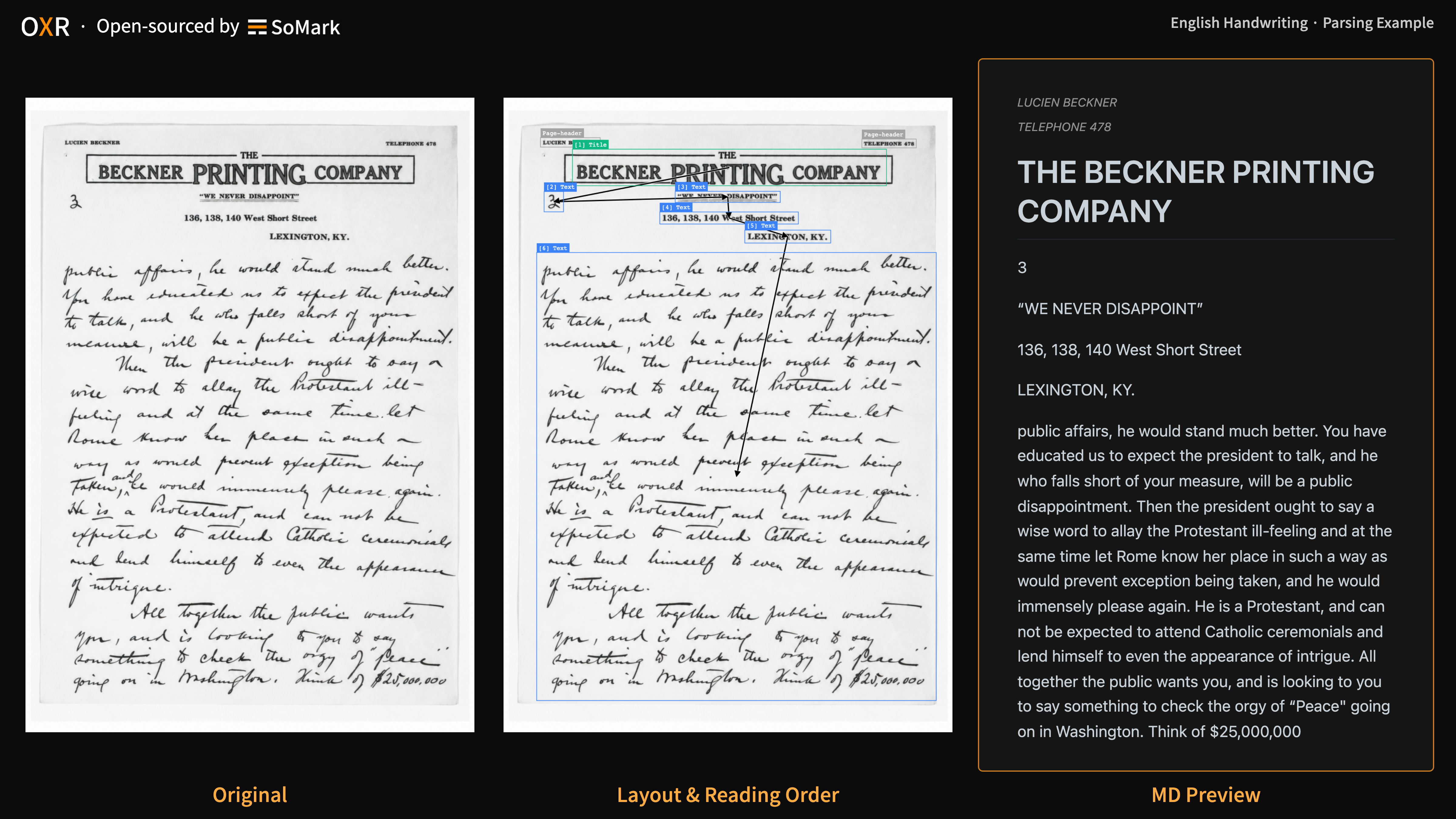
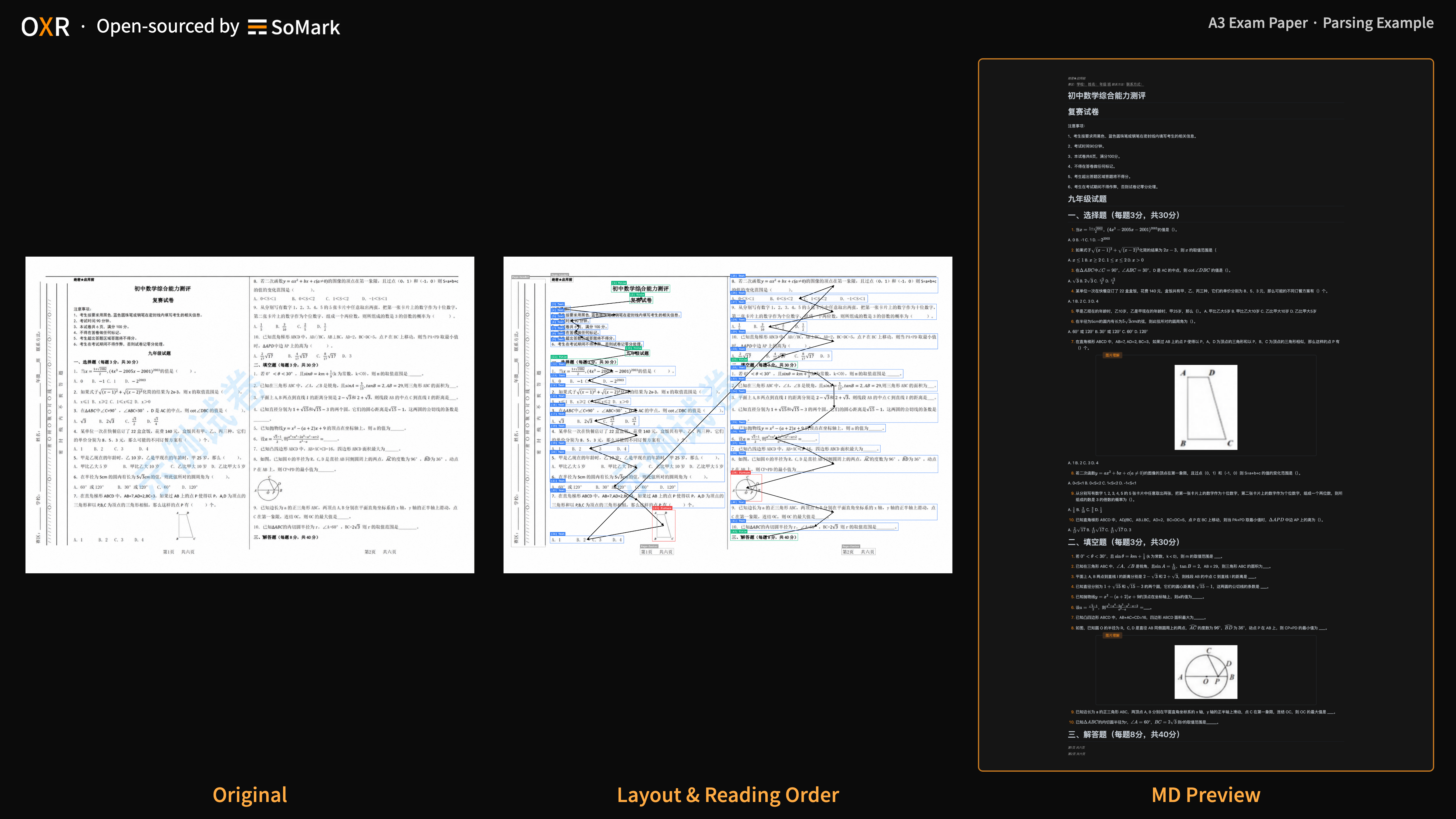
  - OXR can recognize 13 document element types, from formulas and tables to chemical equations, chemical structures, and code blocks, with bounding box coordinates included. It also performs well on challenging documents and layouts, including A3 exam papers, newspapers, vertical text, and handwriting.
  - See [docs/benchmark.md](https://github.com/SoMarkAI/OXR/blob/main/docs/benchmark.md) for the full results and instructions to reproduce the evaluations.
- 🚀 1.3B Parameters. Top-Tier Parsing Speed.

  - With only 1.3B parameters, OXR ranks 🏆#1 among open-source document parsing models in speed tests on the RTX PRO 6000.
  - OXR redesign its processing architecture at the task level to improve parsing speed while maintaining accuracy.
  - See [docs/benchmark.md](https://github.com/SoMarkAI/OXR/blob/main/docs/benchmark.md) for the full results and instructions to reproduce the evaluations.
- 🧩 Pluggable Layout Analysis. Document Structure on Your Terms.

  - Layout analysis requirements vary widely across domains. Even for the same document, element types, region boundaries, and grouping rules can differ depending on the business use case.
  - OXR is the first to make layout analysis independent and pluggable. Its built-in layout model can be replaced while retaining OXR’s recognition and reading order capabilities, enabling adaptation across document scenarios with minimal integration effort.
  - See the [How it works](#how-to-works) section below for details.

<details>
<summary>Expand to see all 13 element types</summary>

| Name | JSON type value | Content or output format |
|-|-|-|
| Caption | Caption | Plain text |
| Footnote | Footnote | Plain text |
| Formula | Formula | LaTeX |
| Text | Text | Plain text |
| Footer | Page-footer | Plain text (filtered out by default) |
| Header | Page-header | Plain text (filtered out by default) |
| Figure | Picture | Image |
| Title | Title | Plain text |
| Table | Table | HTML / Markdown |
| Stamp | Stamp | Plain text / Image |
| Chemical Equation | Chemical Equation | LaTeX (starting with \ce, using mhchem syntax) |
| Code Block | Code Block | Markdown code block |
| Chemical Structure | Chemical Structure | SMILES / Image |


</details>


## Parsing Examples

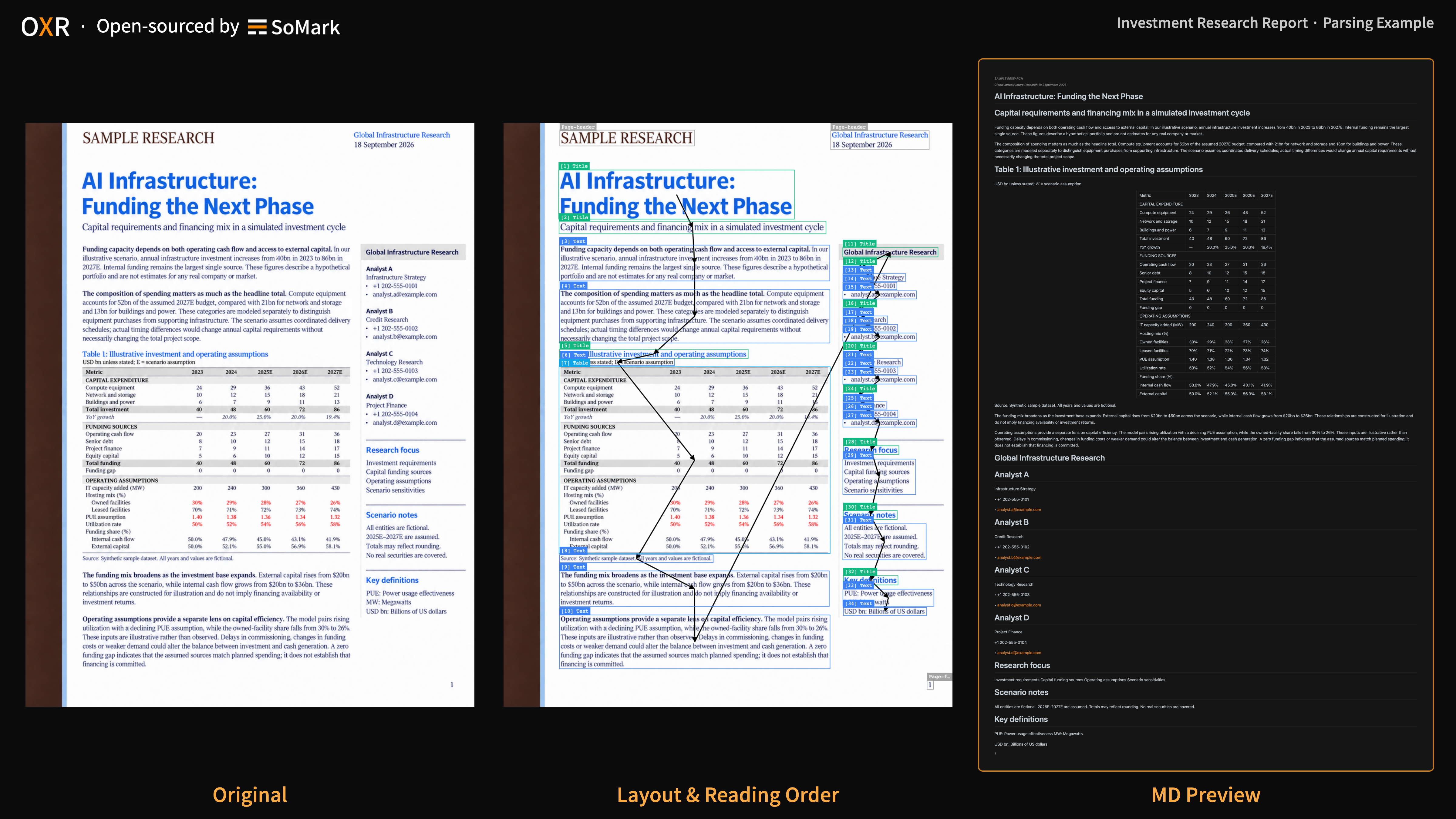
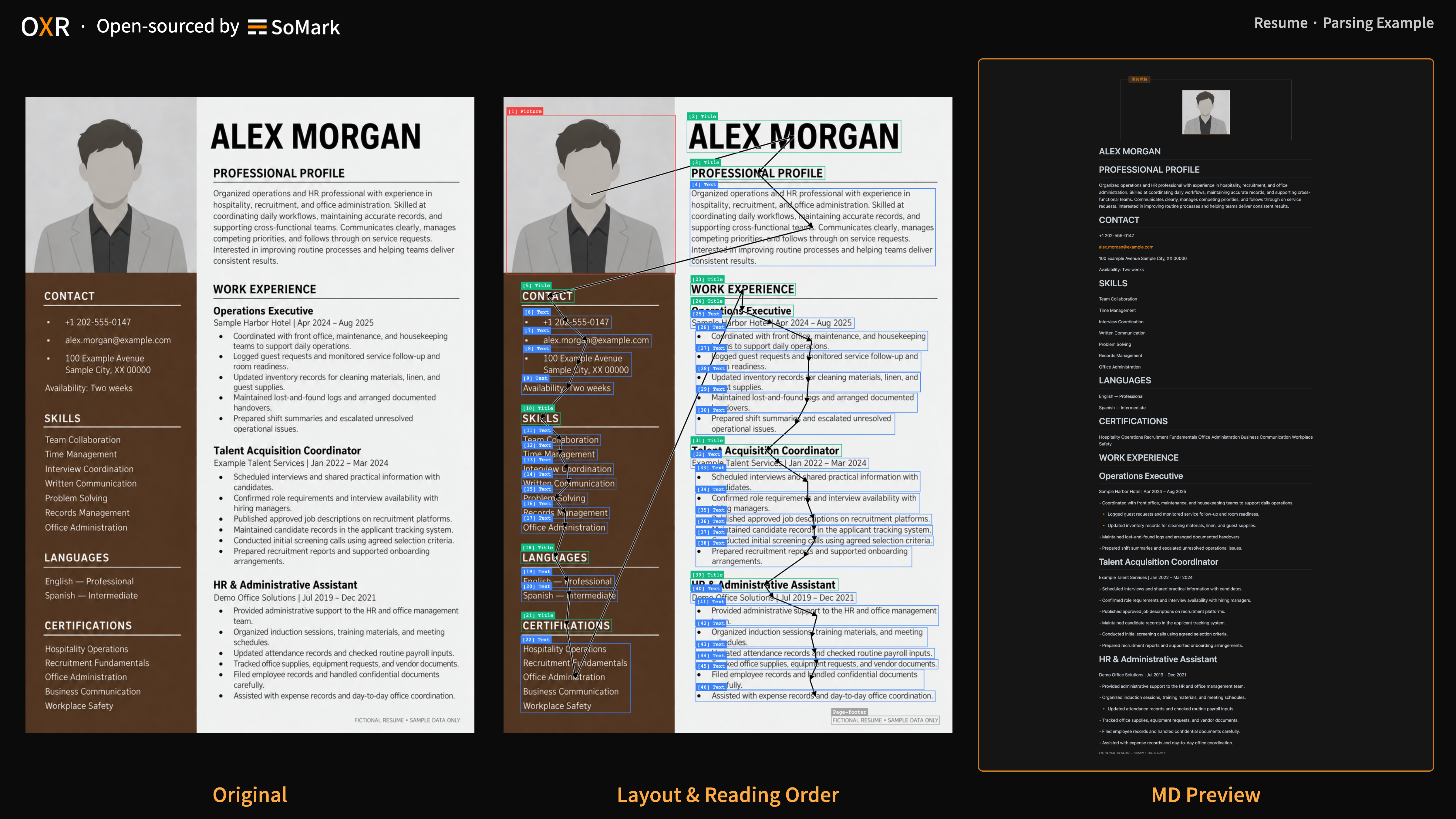
The animation shows OXR's parsing process.

![Animated OXR parsing example](https://raw.githubusercontent.com/SoMarkAI/image_bed/main/OXR_README/assets/oxr_parsing_demo.gif)

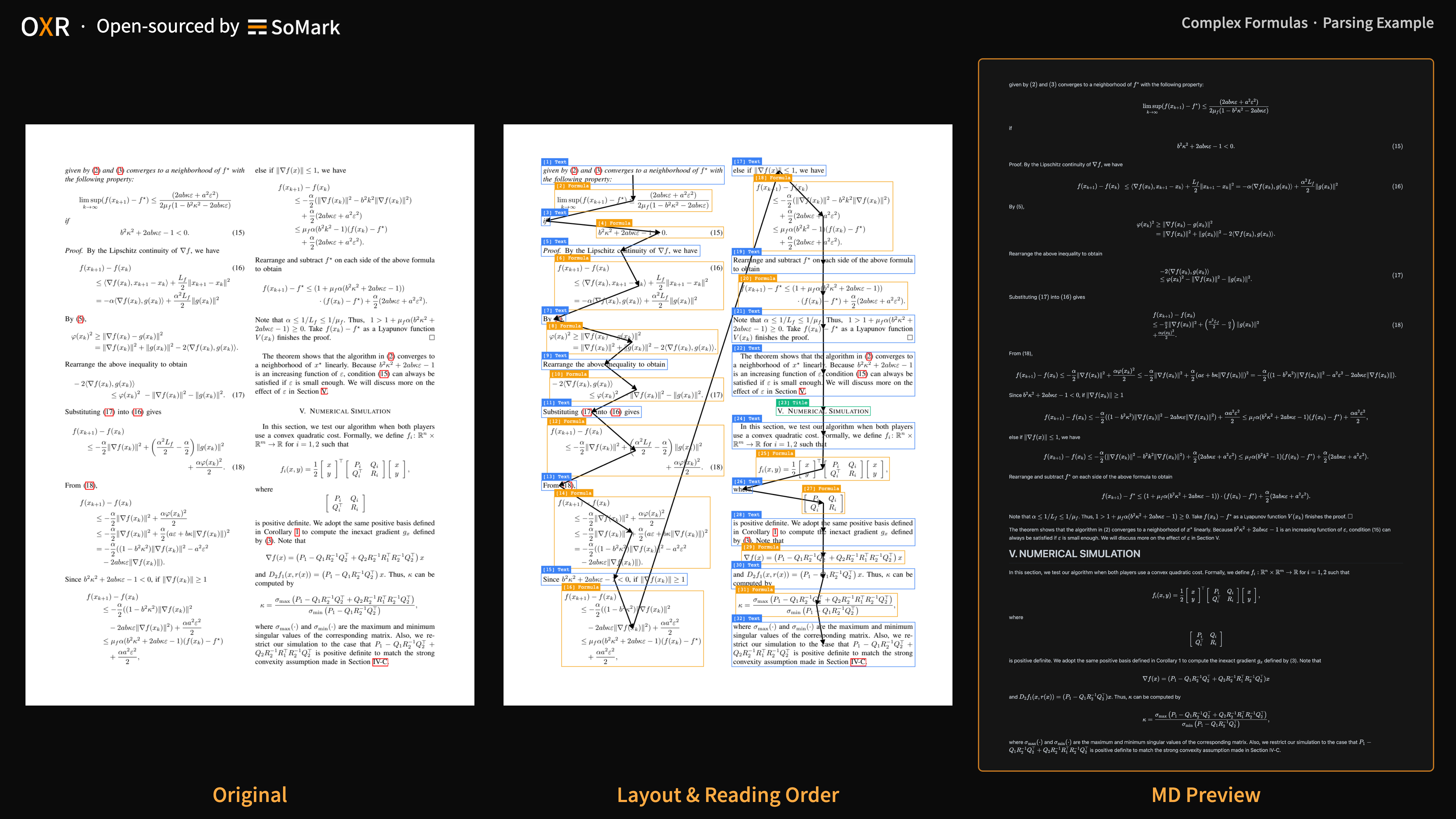
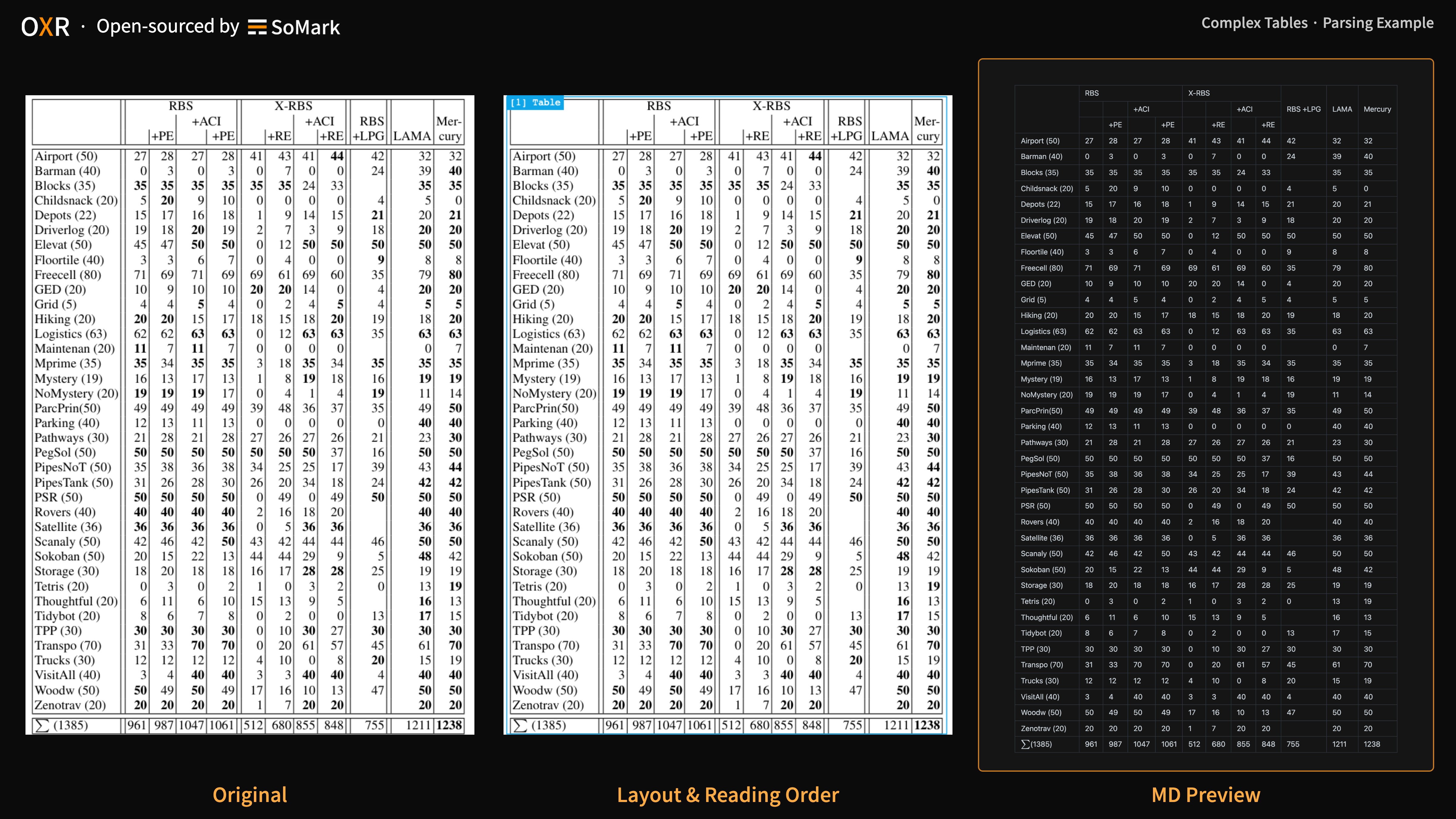
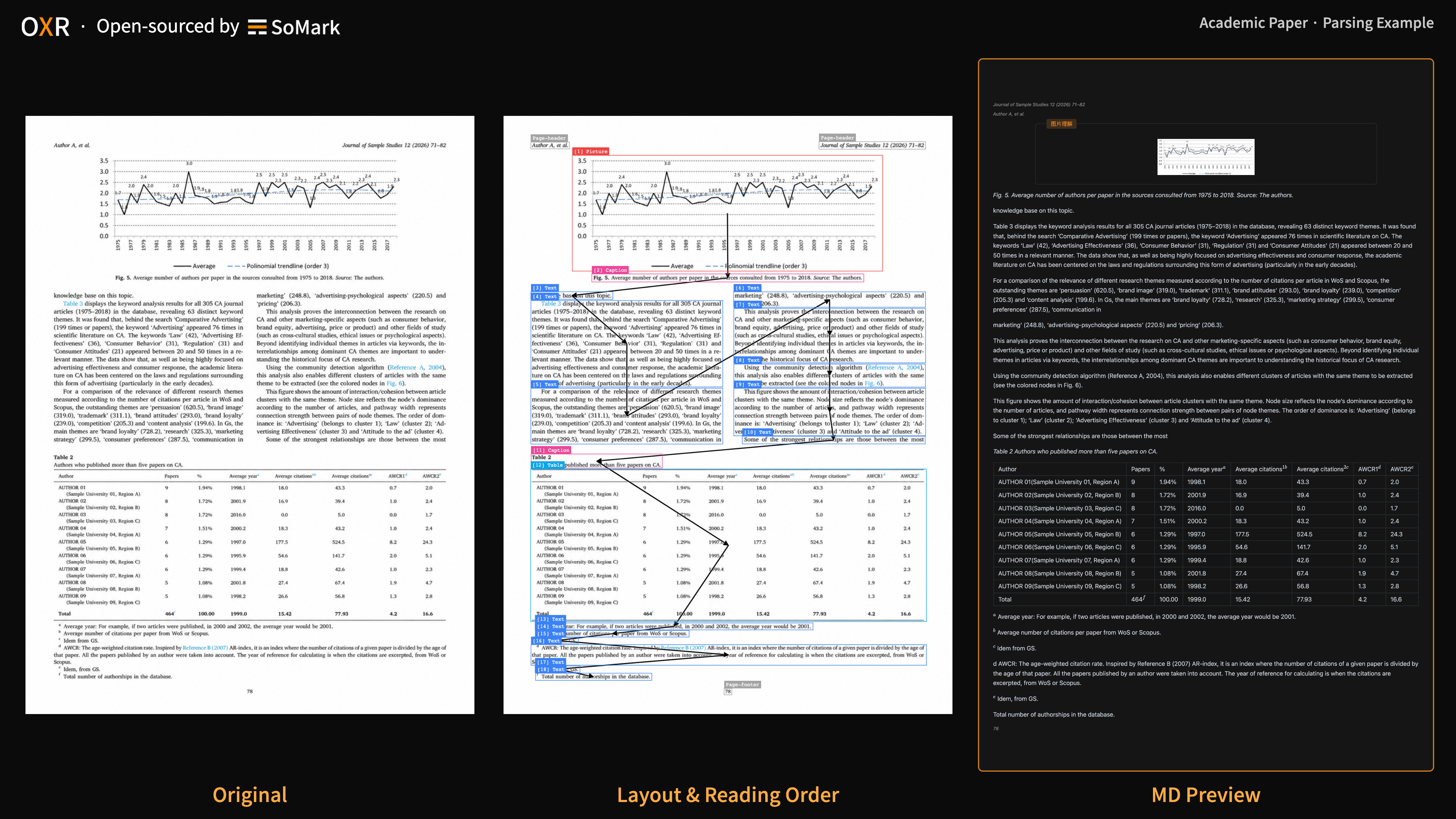
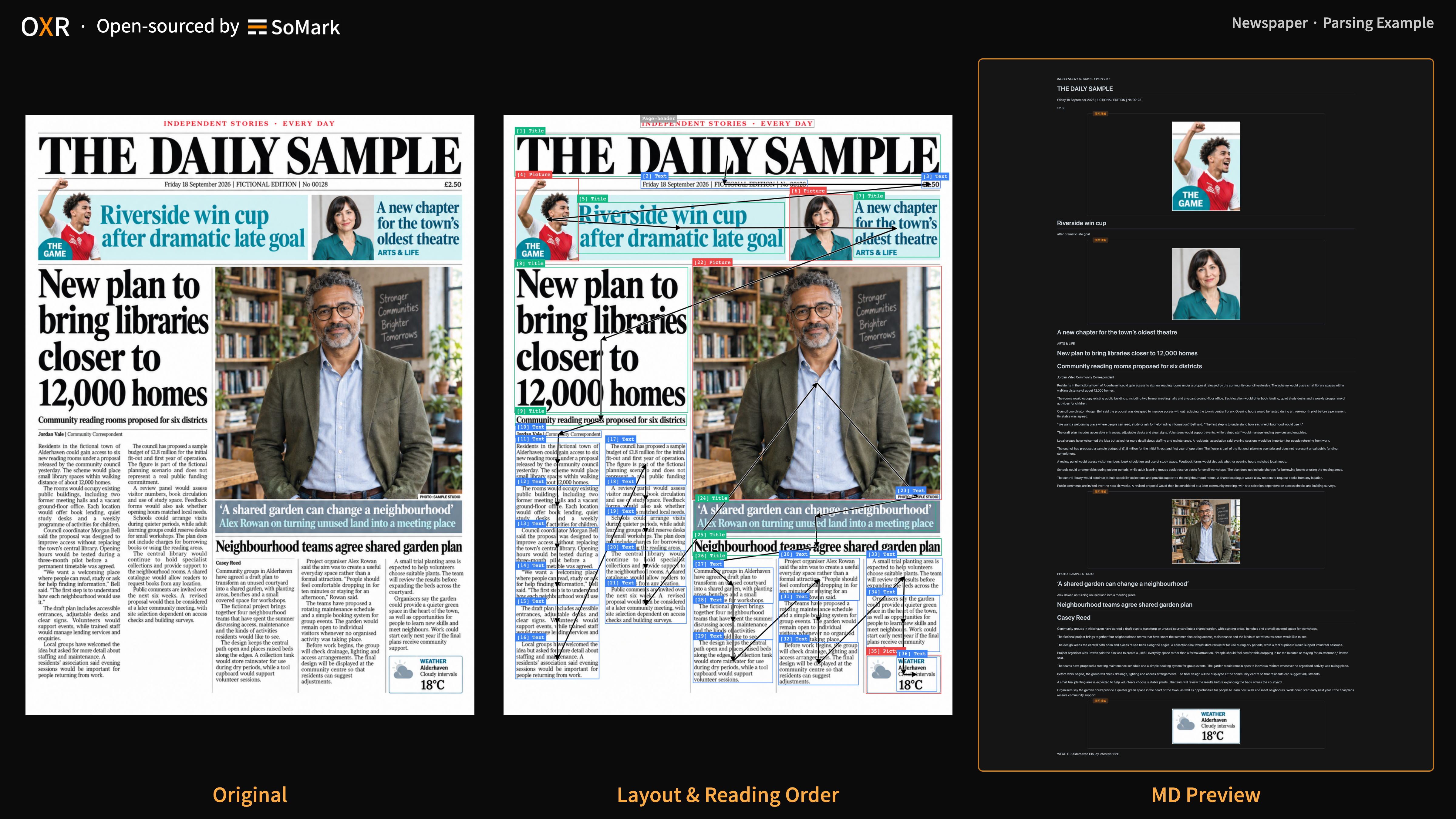
The examples below show OXR parsing different document types. Click an image to view the original.

<table>
  <tr>
    <td align="center" valign="top"><strong>A3 Exam Paper</strong><br/><a href="https://raw.githubusercontent.com/SoMarkAI/image_bed/main/OXR_README/assets/parsing_examples/a3_exam_paper.png"><img src="https://raw.githubusercontent.com/SoMarkAI/image_bed/main/OXR_README/assets/parsing_examples/a3_exam_paper.png" alt="A3 Exam Paper" width="280" /></a></td>
    <td align="center" valign="top"><strong>Chinese Handwriting</strong><br/><a href="https://raw.githubusercontent.com/SoMarkAI/image_bed/main/OXR_README/assets/parsing_examples/chinese_handwriting.png"><img src="https://raw.githubusercontent.com/SoMarkAI/image_bed/main/OXR_README/assets/parsing_examples/chinese_handwriting.png" alt="Chinese Handwriting" width="280" /></a></td>
    <td align="center" valign="top"><strong>Code Block</strong><br/><a href="https://raw.githubusercontent.com/SoMarkAI/image_bed/main/OXR_README/assets/parsing_examples/code_block.png"><img src="https://raw.githubusercontent.com/SoMarkAI/image_bed/main/OXR_README/assets/parsing_examples/code_block.png" alt="Code Block" width="280" /></a></td>
  </tr>
  <tr>
    <td align="center" valign="top"><strong>Chemical Equation</strong><br/><a href="https://raw.githubusercontent.com/SoMarkAI/image_bed/main/OXR_README/assets/parsing_examples/chemical_equation.png"><img src="https://raw.githubusercontent.com/SoMarkAI/image_bed/main/OXR_README/assets/parsing_examples/chemical_equation.png" alt="Chemical Equation" width="280" /></a></td>
    <td align="center" valign="top"><strong>Chemical Structure</strong><br/><a href="https://raw.githubusercontent.com/SoMarkAI/image_bed/main/OXR_README/assets/parsing_examples/chemical_structure.png"><img src="https://raw.githubusercontent.com/SoMarkAI/image_bed/main/OXR_README/assets/parsing_examples/chemical_structure.png" alt="Chemical Structure" width="280" /></a></td>
    <td align="center" valign="top"><strong>Complex Formula</strong><br/><a href="https://raw.githubusercontent.com/SoMarkAI/image_bed/main/OXR_README/assets/parsing_examples/complex_formula.png"><img src="https://raw.githubusercontent.com/SoMarkAI/image_bed/main/OXR_README/assets/parsing_examples/complex_formula.png" alt="Complex Formula" width="280" /></a></td>
  </tr>
  <tr>
    <td align="center" valign="top"><strong>Complex Table</strong><br/><a href="https://raw.githubusercontent.com/SoMarkAI/image_bed/main/OXR_README/assets/parsing_examples/complex_table.png"><img src="https://raw.githubusercontent.com/SoMarkAI/image_bed/main/OXR_README/assets/parsing_examples/complex_table.png" alt="Complex Table" width="280" /></a></td>
    <td align="center" valign="top"><strong>Academic Paper</strong><br/><a href="https://raw.githubusercontent.com/SoMarkAI/image_bed/main/OXR_README/assets/parsing_examples/academic_paper.png"><img src="https://raw.githubusercontent.com/SoMarkAI/image_bed/main/OXR_README/assets/parsing_examples/academic_paper.png" alt="Academic Paper" width="280" /></a></td>
    <td align="center" valign="top"><strong>Newspaper</strong><br/><a href="https://raw.githubusercontent.com/SoMarkAI/image_bed/main/OXR_README/assets/parsing_examples/newspaper.png"><img src="https://raw.githubusercontent.com/SoMarkAI/image_bed/main/OXR_README/assets/parsing_examples/newspaper.png" alt="Newspaper" width="280" /></a></td>
  </tr>
  <tr>
    <td align="center" valign="top"><strong>Research Report</strong><br/><a href="https://raw.githubusercontent.com/SoMarkAI/image_bed/main/OXR_README/assets/parsing_examples/research_report.png"><img src="https://raw.githubusercontent.com/SoMarkAI/image_bed/main/OXR_README/assets/parsing_examples/research_report.png" alt="Research Report" width="280" /></a></td>
    <td align="center" valign="top"><strong>Resume</strong><br/><a href="https://raw.githubusercontent.com/SoMarkAI/image_bed/main/OXR_README/assets/parsing_examples/resume.png"><img src="https://raw.githubusercontent.com/SoMarkAI/image_bed/main/OXR_README/assets/parsing_examples/resume.png" alt="Resume" width="280" /></a></td>
    <td align="center" valign="top"><strong>English Handwriting</strong><br/><a href="https://raw.githubusercontent.com/SoMarkAI/image_bed/main/OXR_README/assets/parsing_examples/english_handwriting.png"><img src="https://raw.githubusercontent.com/SoMarkAI/image_bed/main/OXR_README/assets/parsing_examples/english_handwriting.png" alt="English Handwriting" width="280" /></a></td>
  </tr>
</table>

## How it works

<a id="how-to-works"></a>

### Technical Architecture

The system consists of two models: a Layout Analysis model and OXR. We integrate Reading Order into the Recognition stage, with both tasks handled by the same model. This design improves both speed and accuracy.

We also designed the system this way to make customization easier. We have found that Layout Analysis varies more across document domains than any other module, and it is typically the part that document parsing providers need to customize most. Existing document parsing tools either assign it to the Recognition model or use a dedicated model that also handles Reading Order. OXR's design achieves the simplest access method for Layout Analysis, and any Layout Analysis model can work well with the OXR model.

![](https://raw.githubusercontent.com/SoMarkAI/image_bed/main/OXR_README/assets/oxr_pipeline.png)


### Improvement Through the RSI Loop

For a task like document parsing, where ground-truth answers exist, we have long wanted an engineering system that helps the core model improve itself. The diagram below shows OXR's RSI approach. It targets samples the model gets wrong or handles weakly, improving performance without human annotation. This has made our iteration faster than ever.

![](https://raw.githubusercontent.com/SoMarkAI/image_bed/main/OXR_README/assets/oxr_rsi_loop.png)


## Quick Start

<a id="free-api"></a>

### 0. 🔥 🆓 Free API

OXR provides a free API so you can test parsing on your own documents without registering or requesting an API key.

We'll keep the free API online until we can no longer afford to run it.

⚠️ Note: We do not recommend using the Free OXR API in production. We do not guarantee service stability, and requests are queued, so processing speed may vary slightly.

| Online Demo | https://free-oxr.somark.ai | https://free-oxr.somark.cn |
|-|-|-|
| API URL | https://free-oxr.somark.ai/api/v1 | https://free-oxr.somark.cn/api/v1 |
| API documentation | [https://docs.somark.ai/api-reference](https://docs.somark.ai/api-reference) | https://docs.somark.cn/api-reference |

> somark.cn is a mirror of somark.ai. Choose the domain that works best for your region.

OXR's document parsing API is compatible with SoMark's official document parsing API. You can use SoMark's official document parsing CLI tools, somark-py and somark-js, by changing the **Base URL**. See Section 1.4 for supported endpoints and output formats.

```Bash
# using python
pip install somark
# or using js
npm install -g somark-js

somark --base-url https://free-oxr.somark.ai/api/v1 --api-key dummy \
  parse document.pdf --formats md,json --out ./parsed-output/
```


### 1. Run Locally

```Plain Text
Operating system: Linux
GPU: NVIDIA (with BF16 support)
Driver: NVIDIA driver (compatible with CUDA 13.0)
Python: 3.12 (for model downloads / running from source)
GPU memory to get started: 24GB on a single GPU (for low-concurrency testing)
Recommended GPU memory: ≥48GB on a single GPU (for long documents / higher concurrency)
```

#### 1.1 Download the Code and Models

| Model | Download links | Precision | Includes a lightweight layout analysis model? |
|-|-|-|-|
| OXR-1.0 | [🤗 Hugging Face ](https://huggingface.co/SoMarkAI/OXR-1.0)  <br/>[🤖 ModelScope](https://modelscope.cn/models/SoMark/OXR-1.0) | BF16 | Yes, in the layout_analysis folder |

First, get the code and prepare the environment for downloading the models:

```Bash
git clone https://github.com/SoMarkAI/OXR.git
cd OXR

# pip install -U huggingface_hub
hf download SoMarkAI/OXR-1.0 --local-dir ./models/OXR-1.0

# or using ModelScope
# pip install -U modelscope-hub
modelscope download SoMark/OXR-1.0 --local_dir ./models/OXR-1.0
```

#### 1.2 Start the Services

##### 1.2.1 Run with Docker (Recommended)

We recommend Docker to configure and start all services together.

```Bash
docker build -f docker/Dockerfile.allinone -t oxr-1.0 .
docker run --rm --gpus all --ipc=host \
  -p 127.0.0.1:8000:8000 \
  -v "$PWD/models/OXR-1.0:/models/oxr-model:ro" \
  oxr-1.0
```

Once the startup logs show that the services are ready, open http://localhost:8000/demo or http://localhost:8000/docs.
The first startup may take longer. The default startup timeout is 900 seconds.
See How to use OXR for more advanced options and usage examples.


##### 1.2.2 Run from Source

After downloading the code and models, start the following three services separately. Each service uses its own process and virtual environment. Run all commands from the OXR repository root. The document parsing API depends on both the OXR model service and the Layout Analysis model service, so start the two model APIs first.

**OXR Model Service (Port 8080)**

OXR supports vLLM, but the official vLLM release does not yet support OXR inference. We provide an out-of-tree plugin and a loading script in the model weights folder on Hugging Face. No recompilation is needed: you can use the plugin directly with the official vLLM Docker image or CLI.

```Bash
# pip install vllm==0.25.1 transformers==5.13.1

MODEL_PATH="$PWD/models/OXR-1.0" \
  bash services/oxr/start_vllm.sh \
  --gpu-memory-utilization 0.70 --max-num-seqs 16
```

**Layout Analysis Model Service (Port 8081)**

The Layout Analysis model weights are included in the OXR model weights folder downloaded earlier.

```Bash
# pip install torch==2.11.0 torchvision==0.26.0 --index-url https://download.pytorch.org/whl/cu130
# pip install -r services/layout_analyze/requirements.txt

MODEL_PATH="$PWD/models/OXR-1.0/layout_analysis/last.pth" \
DFINE_DEVICE=cuda \
  python -m uvicorn dfine_la.api:app \
  --app-dir services/layout_analyze \
  --host 127.0.0.1 --port 8081 --workers 1
```

**Document Parsing API (Port 8000)**

Copy the provided `config.example.yaml` to `config.yaml`. Set the url fields under `layout_analyze_model` and `oxr_model` to the addresses of the two services you started above.

```Bash
# pip install -c docker/requirements.allinone.txt .

oxr serve --config config.yaml \
  --host 127.0.0.1 --port 8000 --workers 1
```

Once all three services are running, use the demo and parsing API in the same way as with Docker. See Sections 1.3 and 1.4.

#### 1.3 Open the Visual Demo

Open http://localhost:8000/demo and upload a PDF or image. You can view the original file, Markdown preview, source, layout bounding boxes, and reading order, and download the Markdown.

The demo uses a temporary file cache that expires after 1 hour by default and is renewed during processing. Cached results become inaccessible once the cache expires or is cleared, so download your results promptly.

#### 1.4 Send a Parsing Request

OXR's API is compatible with the SoMark API. Although OXR does not support some specialized capabilities, SoMark's ecosystem fully supports deployed OXR services. Visit the [SoMark website](https://somark.ai) and refer to the [API documentation](https://docs.somark.ai/api-reference).

Call the parsing endpoint directly:

```Bash
curl --fail-with-body http://localhost:8000/v1/parse/sync \
  -F 'file=@document.pdf' \
  -F 'api_key=dummy' \
  -F 'output_formats=markdown' \
  -F 'output_formats=json'
```

SoMark provides a full set of CLI and SDK tools for document parsing in Python and JavaScript. OXR is compatible with their document parsing interfaces, so you can use them by changing the baseURL. For more information, see https://docs.somark.ai/en/cli-sdk.

```Bash
pip install somark

somark --base-url http://localhost:8000/v1 --api-key dummy \
  parse document.pdf --formats md,json --out ./parsed-output/
```

## Ecosystem

The SoMark team has developed a range of tools for document parsing. If you find them helpful, please give them a ⭐ Star.

|  | Description | Project URL |
|-|-|-|
| SoMarkDown | The official Markdown parsing and rendering library for SoMark and OXR | https://github.com/SoMarkAI/SoMarkDown |
| SoMarkDownViewer | A live editing application for SoMarkDown | https://github.com/SoMarkAI/SoMarkDownViewer |
| SoPDF | A high-performance PDF processing library with a permissive open-source license | https://github.com/SoMarkAI/SoPDF |
| Docision | MultiModal Jev for Document. | https://github.com/SoMarkAI/docision |
| somark-py | The official Python SDK & CLI for SoMark and OXR | [https://github.com/SoMarkAI/somark-py](https://github.com/SoMarkAI/somark-py) |
| somark-js | The official JS / TS SDK & CLI for SoMark and OXR | https://github.com/SoMarkAI/somark-js |

---

<div align="center">
<img src="https://raw.githubusercontent.com/SoMarkAI/image_bed/main/OXR_README/assets/OXR_Star_on_GitHub.gif" width="800" />
</div>

## Citation

For now, please cite the OXR-1.0 open-source project. We will add a paper citation once the technical report is published.

```bibtex
@misc{somark2026oxr,
  author = {{SoMark}},
  title = {{OXR-1.0}},
  url = {https://github.com/SoMarkAI/OXR},
  note = {GitHub repository}
}
```

## License

OXR is released under the [OXR Open Source License](./LICENSE), a custom license based on Apache 2.0 with additional terms.

For further services, contact the SoMark team at [somark.ai](http://somark.ai).

## Community

Join the OXR community to discuss document parsing, share feedback, and keep up with the latest updates.

- [Discord](https://discord.gg/msCPj2AtNN) — Discuss OXR, exchange tips, and share what you're building.
- [X / Twitter](https://x.com/somarkai) — Keep up with OXR releases and news from SoMark.
- [GitHub Issues](https://github.com/SoMarkAI/OXR/issues) — Report bugs, suggest features, and track progress.
- **WeChat** — Scan the QR code below to join the OXR group and exchange ideas with other users.

<p>
  <img src="https://raw.githubusercontent.com/SoMarkAI/OXR/main/assets/wechat-community.png" alt="QR code for the OXR WeChat group" width="200" />
</p>